
Dear PYP Families,
As you know, as part of our transition into the Nord Anglia family, this year we have introduced a new platform that replaces our H-ello App and will also serve as our new attendance platform: the Family Portal (FP). Together with Toddle, these two platforms provide what you need to be fully updated and informed about your children’s learning journey at H-FARM International School.
To help you get familiar with the new system and easily find your way around, here’s a quick overview of what you’ll find on each platform and where to access the information you need.
TODDLE
Toddle remains our main teaching and learning platform. Through Toddle, you will continue to have access to:
- Your child’s academic progress and evidence of learning
- Reports
- Communications from teachers about the whole class
- Other teaching and learning information shared throughout the year
To log in into Toddle, each family needs a unique code that is linked to their children: please let us know if you have lost access.
What changes? Just attendance, that is no longer managed through Toddle. All attendance-related requests must be submitted only through the Family Portal, starting from November 3rd. During this transition period (from now until November 3rd), both systems will remain available. However, we encourage you to familiarize with the Family Portal and begin using it instead of Toddle. After November 3rd, attendance will be disabled on Toddle and you won’t see the attendance button anymore.
FAMILY PORTAL (FP)
The Family Portal is designed to bring together, in one place, the key links, information and documents you need for your child’s school life. The FP can be accessed also as an App on your mobile phone (see how to add it below). Through the FP you can access:
- Class timetable
- Direct links to: Toddle, the school website, Uniform Shop, SON, Enrolment/Trips platform, Bus App
- School News/SON articles
- School calendar and upcoming events
- Attendance: please note that all absence requests are subject to approval or rejection by the school. We kindly ask you to provide complete and detailed information when submitting a request. Requests indicating “Family Reasons” or missing further explanation will not be considered valid, and your child will be marked as having an unexcused absence. For guidance, please watch this “How to Add a Leave Request on Family Portal” video.
- Teacher Contacts
- Parent Resources (the monthly Lunch Menu and the school calendar are updated, the Trips section and the Parents Workshops will be added soon)
- Key Policies and Documents (Coming Soon)
Please note that some of these features (the Parent Resources for instance) are accessible through the dashboard by selecting the three lines in the top-left corner of the FP, but the main ones are in the homepage directly.
We’ve created a collection of short video tutorials to help you make the most of the FP: from creating an account and emailing your teachers to accessing resources, reporting an absence, and much more. These quick guides will easily walk you through everything you need to know.
Here’s a short visual recap of the Toddle/FP overview:
| TODDLE | FAMILY PORTAL |
| Reports | Attendance |
| Academic Progress | Teachers Contacts |
| Evidence of Learning | Class timetable |
| Teaching/Learning information from the teachers | Resources (lunch menù, trips, parent workshops, key policies and documents…) |
| Calendar & Events | |
| Direct links to Toddle, SON, Bus app, uniform shop, enrolment platform, website |
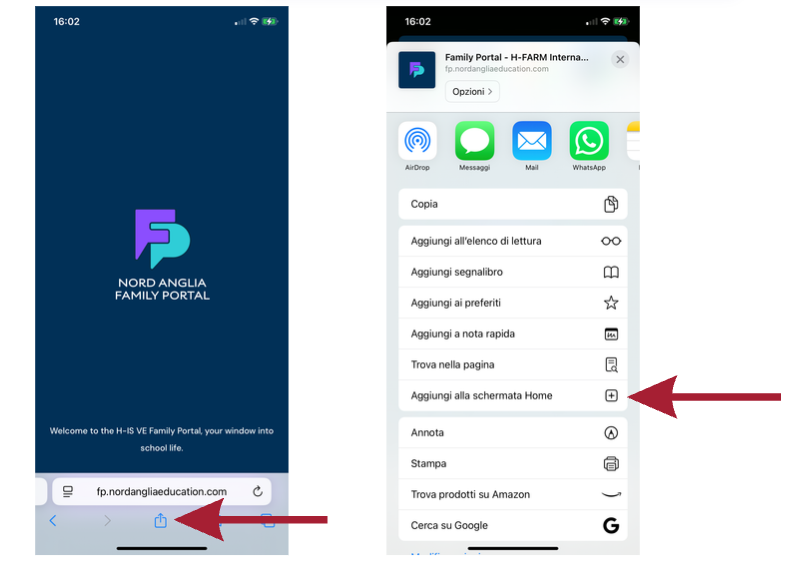
If you would like to add the FP as an icon on your mobile device, open the FP on your mobile, then click on the “Share” button and select “Add to Home Screen” (see screenshot below).
The content will continue to grow over the coming weeks and months, with new information, guidance and resources being added progressively as they become relevant throughout the school year. We encourage families to check the Portal regularly, as it will become an increasingly valuable point of reference for school life and practical information.
If you have not yet received an email with your credentials to create your FP account, please contact the Students Office office.ve@h-farmschool.com
Best regards,
PYP Students Office